

ElevenLabs – A High-Quality Audio Generation Tool
By Lidia Gault, University of Wisconsin-Madison
DOI: https://www.doi.org/10.69732/TPCD3222
Introduction
While language instructors can easily get access to a plethora of listening materials available online, sometimes I still find myself struggling to locate exactly what I want my students to listen to. In other cases, I find an authentic text that would work great as an audio and need to figure out a way to create that recording. Text-to-speech generation has been around for a while, but it has reached an entirely different level with AI-powered voice generation tools. ElevenLabs has become my reliable source for generating listening materials for my L2 students. The main reason why I like this tool is due to its wide variety of features, for example, image or video generation, a voice isolator, transcriptions, and many others. Another reason to use this platform instead of other voice generators is because it has a large library of high-quality voices to choose from, even for less commonly taught languages (LCTL) like Arabic, Finnish, or Russian.
| Name of the tool | ElevenLabs |
| URL | https://elevenlabs.io/ |
| Primary purpose | Audio, video generation |
| Cost (as of July 2026) | The free version includes about 10 minutes of text-to-speech generation a month and three voices to use. No video generation is available with the free version.
Starter subscription is $5/month, Creator – $22/month. |
| Languages available | 70+ languages |
| Ease of use | Easy for basic services (text to speech, sound effects, voice changer), intermediate to advanced skills are useful for high quality video generation or more complex projects |
Although ElevenLabs offers more capabilities for media generation, this advancement comes with concerns of cybersecurity, authenticity, generation of deep fake materials, and overall misuse of gen-AI (Genelza, 2024; Valdez, 2025), which fall beyond the scope of this review. For example, voice cloning (creating a copy of a voice from as little as 10 seconds of the recording of that voice) has already been used in education (see Pérez et al. (2021) for a discussion of cross-lingual voice cloning of media in higher education settings). Being aware of how this and other powerful generative AI tools can be potentially misused, developing AI literacy, and prioritizing the ethical use of AI is extremely important for both instructors and students. For these reasons, this review will focus on the text-to-speech generation and voice changer features, not focusing on other available features.
Overview of the Tool
To get started, users are required to sign up and choose a subscription plan. Users with the free version get 10000 credits per month, which equals about 10 minutes of text-to-speech generation and 8.3 minutes of voice changer (replacing the voice with a different one but keeping all other characteristics). However, if you are not satisfied with the generated audio (for text to speech), you can change the voice or regenerate at no additional cost in your credits. The free version also includes three custom voices saved in your profile. They can be changed based on your needs for the specific recording you are generating. The website features a user-friendly design and is easy to navigate. “How to” documentation is also available. Users can download generated audio as an .mp3 or as an .mp4 for videos.
Subscription Plan Options
There are no special rates for educators; however, a free version is available, and the lowest starter package is $5/month. The Starter version includes 30000/credits, which is enough to generate around 30 minutes a month of text to speech, 30 minutes of voice changer, or about three minutes of video. A full list of pricing and features is available on the website.
Compared to other AI-voice generation tools, ElevenLabs stands out because of the wide range of voices users can choose from, a high-quality final product, and the wide choice of tools the website offers. Language instructors, including LCTL instructors, who are looking for a variety of accents can find these among voices on ElevenLabs, unlike several other AI-powered audio generation tools. For example, English has more than forty accents included, a commonly taught language like Spanish has Puerto Rican, Andalusian, Mexican, Argentine, and other accents are available. Russian is offered with Moscow, St.Petersburg, Odessa, and Georgian accents (at the moment of writing this).
Practical Uses for the Language Classroom
Text-to-Speech Feature
The text-to-speech option is useful when you have an authentic text or a written text (including AI-generated texts) that you would like to use as audio. Texts that are written for language learners may include specific vocabulary or grammar that their instructors want them to focus on. In both scenarios, the text is inserted into the window. Then you can choose the voice and accent (if applicable).
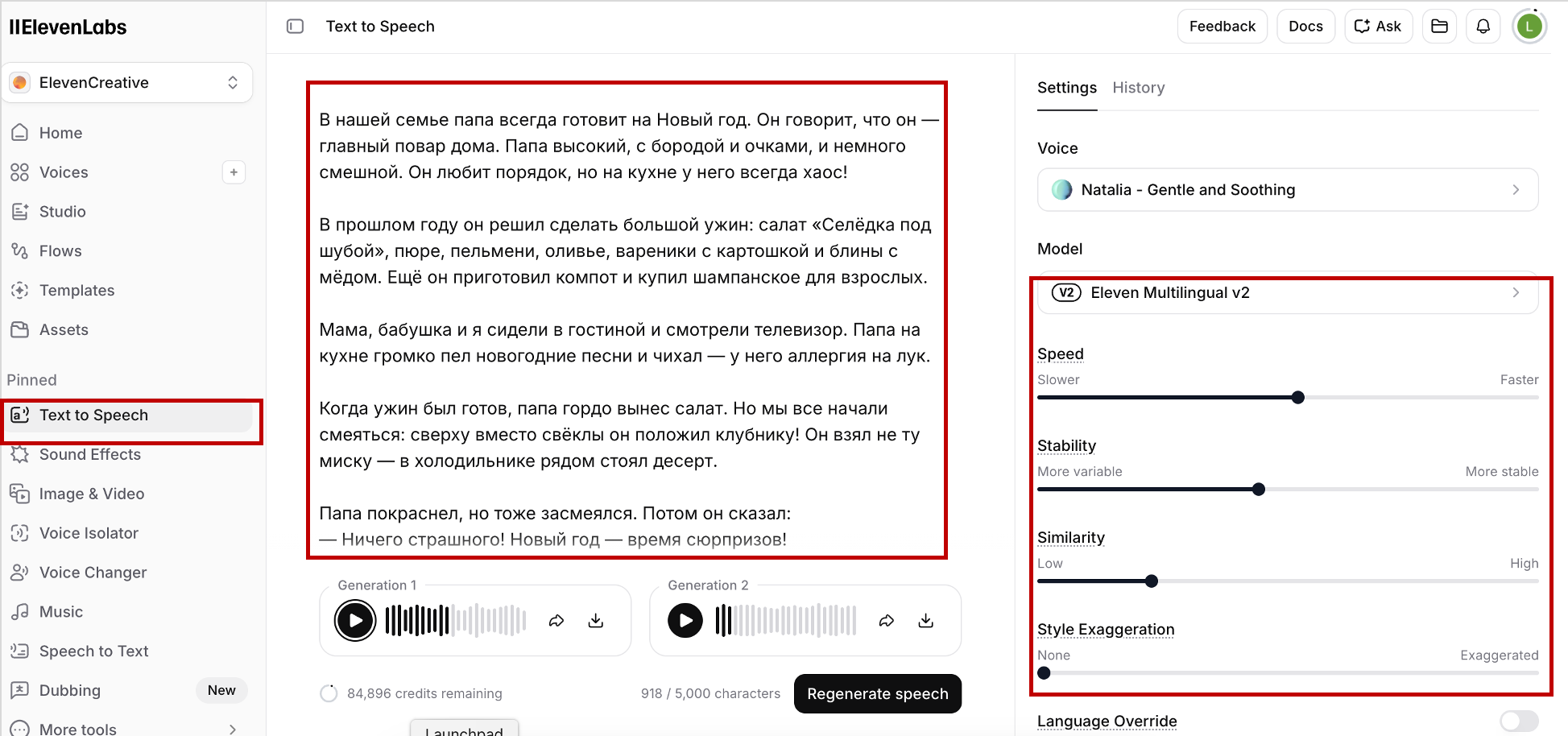
If you want to add voice-related sound effects (a laugh, sneeze, whisper, etc.) or environmental sound effects (transport, applause, rain, etc.), you should choose “Eleven Multilingual v3” under “Model”. You should also use this model to generate audio with two or more speakers.
![Picture 2 - Text-to-Speech Generation with Multiple Speakers.Voice-related sound effects are embedded in the text in English in [square brackets]](https://fltmag.com/wp-content/uploads/2026/08/Picture-4-Text-to-speech-multispeaker-Lidia-Gault.png)
Voice Changer
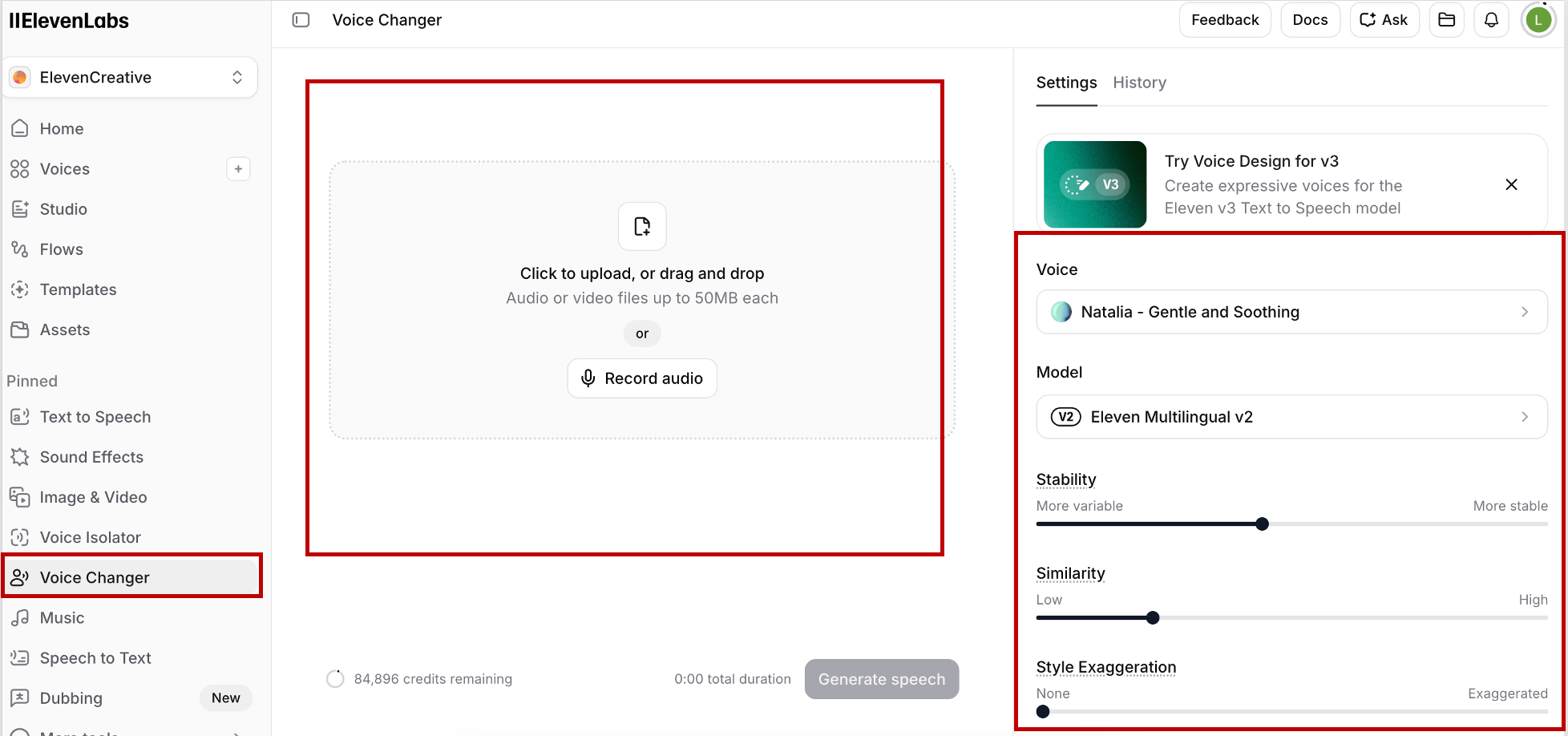
One of the reasons to use the “Voice Changer” feature is to expose L2 learners to a wider variety of voices and accents. Sometimes generated audio still does not meet the standards that instructors want in terms of, for example, intonation or pauses. For example, the instructor wants to create a recording where certain words are emphasized or a recording in which an intonation pattern does not follow the rules. In that case the instructor can upload a recording or make a recording on ElevenLabs with proper intonation/emphasized words, etc. and then choose a different voice that will mimic the pauses, intonation, and the speech rate of the original recording. Depending on the model you are using, it is possible to adjust such characteristics as speed, stability (consistency between re-generations), similarity (similarity to the voice chosen), style exaggeration (exaggeration of the voice’s features), remove background noise, or boost the speaker’s voice.
Drawbacks
Even though the quality of generated products is high, it sometimes takes time to find the voice that will produce desirable results. For example, for a morphologically rich language like Russian, the tool is not consistent in pronouncing numerals when they are not in the nominative case. The way to fix this is to spell the numbers out. Pauses and intonation in the generated sentences can also be unnatural. Generated audio usually uses intonation patterns that are standard for a certain language, for example, not being able to put emphasis on certain words or change the intonation in questions. The voice changer feature is a good solution for that problem, because the generated voice will mimic the original recording’s pauses and intonation if those follow the desired pattern. Additionally, some of the voices that are claimed to be accented, either do not reflect the accent claimed or exaggerate it to the point of being humorous. Video generation, while not described in detail in this review, is limited to short clips (up to 20 seconds, depending on the model) and requires very detailed prompts. More intuitive prompts for video generation will result in less natural looking videos.
Conclusion
The most important advantage of the ElevenLabs is its support of 70+ languages, the availability of different accents, and the wide choice of options that users have. Language educators with more advanced tech skills can also use this platform to create a full spectrum of other multimedia materials (images, video, dubbing, avatars, etc.) with a paid subscription. These features are not described in this review, but they may also be of interest to language educators. Dubbing enables translation of audio and video, while keeping the intonation, emotion, and other characteristics of a speaker. Instructors can also use the video generation feature to create short videos and add voice or subtitles to them. ElevenLabs is a powerful tool that enables language instructors to create high-quality audio and video materials.
References
Genelza, G. G. (2024). A systematic literature review on AI voice cloning generator: A game-changer or a threat?. Journal of Emerging Technologies, 4(2), 54-61.
Pérez, A., Garcés Díaz-Munío, G., Giménez, A., Silvestre-Cerdà, J. A., Sanchis, A., Civera, J., Jiménez, M., Turró, C., & Juan, A. (2021). Towards cross-lingual voice cloning in higher education. Engineering Applications of Artificial Intelligence, 105, 104413. https://doi.org/10.1016/j.engappai.2021.104413
Valdez, H. P. D., Abri, F., Webb, J., & Austin, T. H. (2025). Exploring the Use and Misuse of Large Language Models. Information, 16(9), 758. https://doi.org/10.3390/info16090758
AI disclosure: Generative artificial intelligence was not used in the preparation of this article.
Thanks for the practical classroom angle. The point about struggling to find listening material at exactly the right level resonates: generating a short dialogue with a chosen accent and speed is much faster than hunting for an authentic clip. The credit breakdown for the free tier is also useful, since about ten minutes of speech a month is enough for a few targeted exercises but not a whole course. I also appreciate that the drawbacks section addresses deepfake and authenticity concerns, which seems important to discuss openly with students when using cloned or synthetic voices.