
Gamify Your Language Classroom in Seconds with Padlet Arcade
By Wenjing Huang, Chinese Teacher, George School

DOI: https://www.doi.org/10.69732/HCOC4088
Introduction
Arcade is a new feature in Padlet since February 2026. It is an AI-powered game creation platform that turns a topic, a file, a website content, or a YouTube video into an interactive learning game in just a few minutes. Whether used by an educator to prepare for a class or a student for self-study, Arcade makes it easy to create and play educational games.
| Name of the tool | Padlet Arcade |
| URL | https://arcade.padlet.com/ |
| Primary purpose of the tool | A platform to create custom learning games in under a minute. |
| Cost | Currently free to use (as of June 2026), but subject to the limits of your Padlet account (free accounts have a limit of 3 active Padlets) |
| Ease of use | Simple and easy to build a game, share it with a class and watch participants play in a few minutes, no design or coding skills required. |
Overview
1. Access Arcade Feature in Padlet
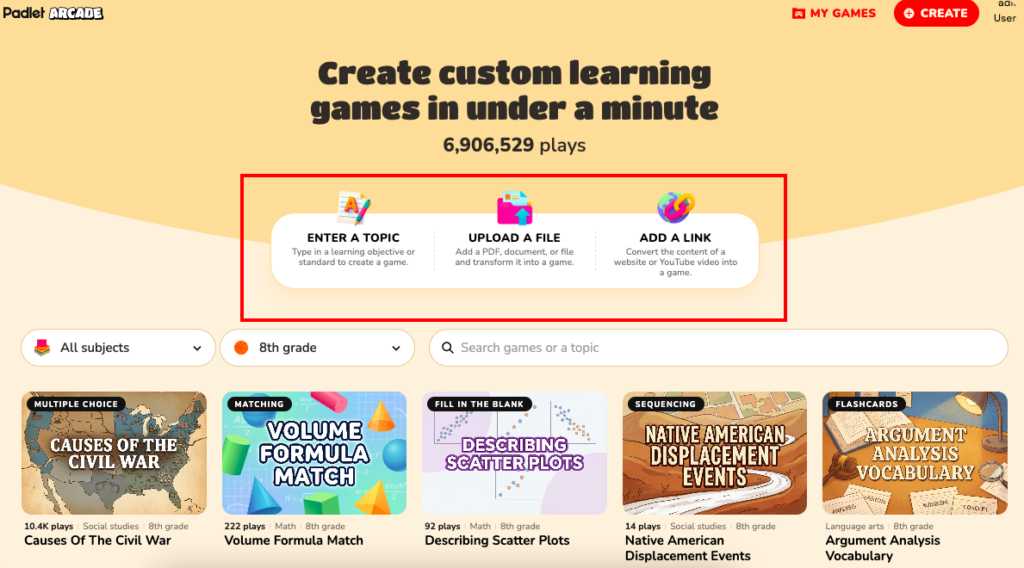
The Padlet Arcade homepage is designed for both game creation and discovery. The top of the site features a navigation bar with options to “Create” a new game or access “My games” to view your personal library. The center of the homepage allows users to start the AI-powered creation process by typing a topic, uploading a file, or adding a link. Under that, you can select specific subjects (language arts, math, science, social sciences, world languages, arts, health, and seasonal) and grade levels (K to 12th grade, and higher ed) to find ready-made content, which is a curated gallery of featured games that users can try out or remix for their own needs.
2. Create, Edit, and Save a Game
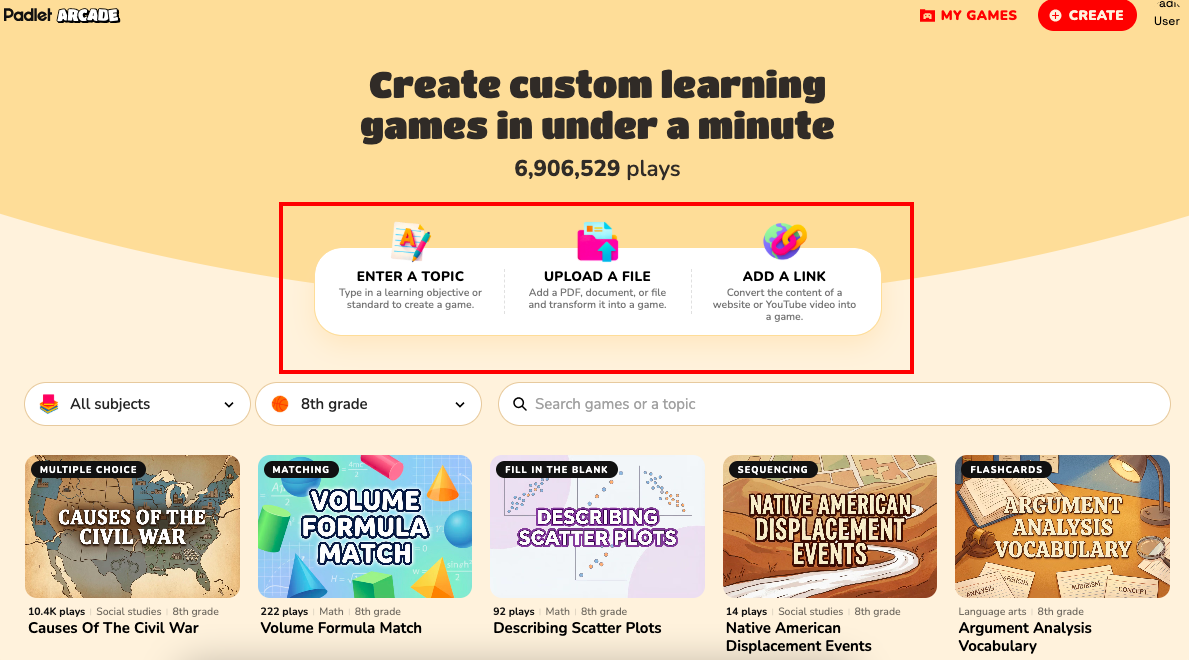
The Arcade provides three intuitive ways (see Picture 1) to describe your game and initiate the AI creation process.
- Enter a topic: type a topic or a learning objective directly, and the system will generate a game in whatever language you used for the description.
- Upload a file: add a document, a PDF, or a file to have the AI turn that specific content into an interactive review tool.
- Paste a link: convert a website content or a YouTube video link into a complete game with mechanics and images in under a minute.
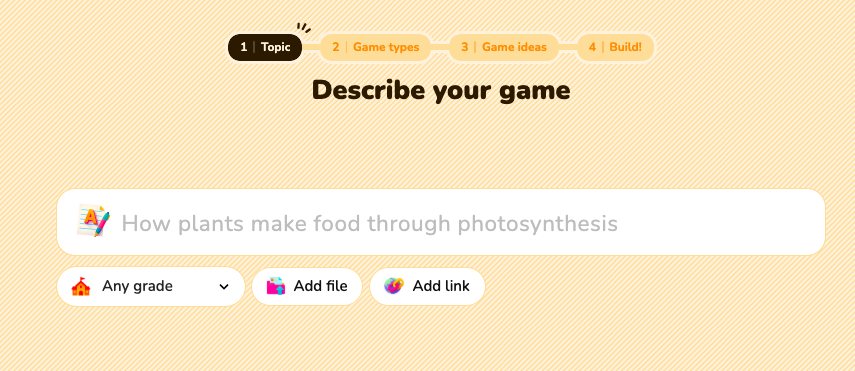
To create a game in Arcade, there are three steps.
- Describe your game: type a specific topic or objective with the options to add your grade level, a file, and a link.
- Pick a game type from various template formats such as Word Search, Crossword, Multiple Choice, Matching, Sorting, Sequencing, Flashcards, Memory tiles, Fill in the blank.
- Select game ideas: depending on your topic input in Step 1, you will be shown some game templates (from the above Step 2’s game types) and asked to select a game to build.
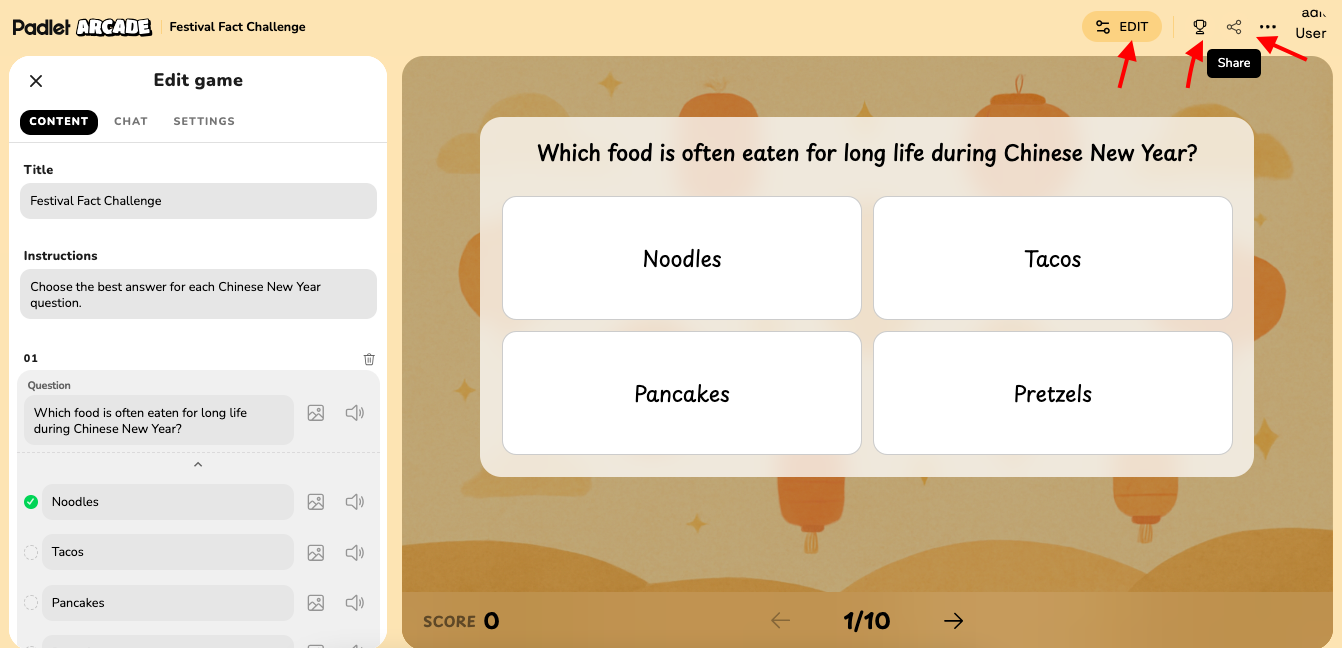
Then the game will be created shortly. After that, it shows the editing mode, so you can fine-tune the content to ensure it perfectly matches your instructional goals or add more content to it. Users can directly make adjustments to the title, instructions, questions, correct answers, and explanations of the game.
Images can also be added to many of the game elements. If you click on the image icon, then a search comes up where you can choose the perfect image. Or to save time, you can ask the game generator in the “Chat” to add an image to each question. It does a pretty good job of finding a good default image, but you can also tweak its selections from the “Content” tab.
Though the system allows you to add AI-generated audio (text or sound effects) to some of the game elements, there are several drawbacks to this. One is that there is apparently no way to select a language other than English as the default language, meaning that you have to select the language anew for every question and answer. A workaround that seems to work at least in some instances is requesting audio for each item via the “Chat” function. In some game types, the audio will not play, so you should try it out as you are creating your game. Hopefully, Padlet will continue to improve these features in the future.
If you click the “edit” button again on the top right, it will then switch to a play mode for users to type in a name to test the game.
To save a game that has been created, you click the three dots on the top right, then choose “save”. Then this will be saved in “My Games” on the top right of the homepage. As of June 2026, Padlet Arcade allows users to save and bookmark an unlimited number of games to their personal account. However, if you are using a free Padlet account, your limit applies to the number of active Padlet boards you can create.
3. Share and Play a Game
On the top right of the editing page, there is also a “share” button. You can share the game using a link, a QR code, on social media, add it to a Padlet, export to a PDF, or via an embedded link. While a Padlet account is required to create and save these games, players can access and play them without needing an account of their own. As of June 2026, all gameplay is single-player and asynchronous. Players compete on the leaderboard across separate sessions. There is no real-time multiplayer or live host mode, though you could share the game with students at the same time. They would then join from their devices, where they are asked for a name, and play at the same time, with results accessible in the leaderboard, which you could then show from a projector or through screensharing (you can also select in the settings whether players can see the leaderboard, or just the instructor).
The leaderboard is where you can watch your students’ scores. This automatic leaderboard serves as a central hub for tracking performance, displaying player names, scores, completion times, and the number of attempts.
Practical Uses for the Language Classroom
1. Ideas for Learners
Language learners can transform their study routines by leveraging Padlet Arcade’s diverse game formats to actively reinforce target language acquisition.
- Matching or Flashcards: By uploading class notes, vocabulary lists, or authentic texts, students can instantly generate matching activities or flashcards to master high-frequency vocabulary.
- Fill in the Blank: this can be used to practice challenging verb conjugations and syntax in context.
- Sorting: For deeper comprehension, students can utilize this to categorize cultural nuances or grammatical structures.
- Sequencing: This can be used to arrange steps into the correct order, arrange events, and reconstruct narratives, which is particularly effective for improving reading flow and understanding temporal markers (such as time adverbs, frequency adverbs, sequencing connectors) in the target language.
2. Ideas for Language Educators
Here are some specific ways that language educators can implement Padlet Arcade to boost student engagement and practice across different proficiency levels.
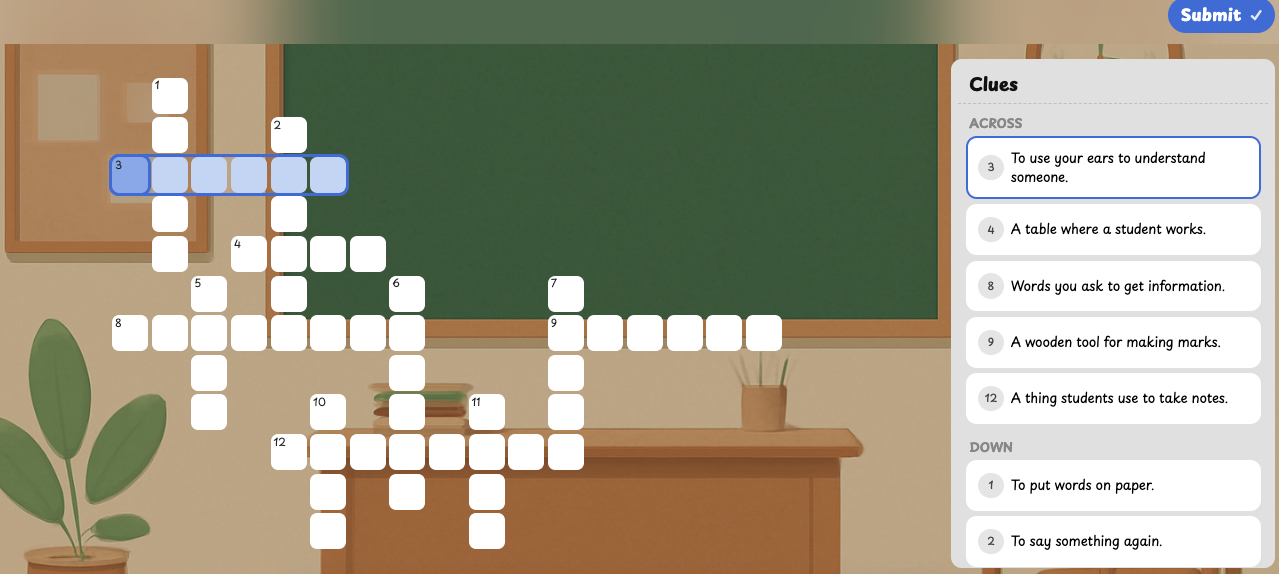
- Classroom Communication Crossword: generate a crossword (see Picture 5) focused on essential classroom communication phrases, such as “Can you repeat?”, “Can I go to the bathroom?”, “I don’t understand,” or “How do you say… in [target language]?” This gamifies the “survival language” students need during daily routines, making it more likely they will use these phrases during class. Note that the crossword activity type works with both Roman and Cyrillic alphabets, as well as Pinyin, but not with languages like Chinese.
- “Error Hunt” with Multiple Choice: Instead of a standard quiz, upload a short paragraph written in the target language that contains intentional grammatical errors. Use the Multiple Choice format to create a “Find the Mistake” challenge where students must identify the incorrect verb tense or agreement and select the grammatically correct version. This builds proofreading skills and deepens their understanding of common pitfalls.
- Audio-Visual “Memory Tiles”: Rather than just text, search images of cultural artifacts, food, or landmarks in Padlet, then pair them with their descriptions or names in the target language to the Memory Tiles game. This turns a standard identification task into an interactive, high-energy memory challenge that reinforces the connection between visual culture and vocabulary without relying solely on rote translation.
- Collaborative Fill in the Blank: Use the Fill in the Blank format to create short, situational dialogues (e.g., ordering at a cafe or asking for directions). Have students complete these in small groups as a race to see who can fill in the missing functional language fastest. This encourages quick thinking and collaboration, preparing them for spontaneous, real-world conversational scenarios.
Conclusion
Padlet Arcade is a time-saving tool that seamlessly bridges the gap between passive course content and active, gamified learning. Research indicates that gamification can support student motivation, learning, and 21st century skills (Qian & Karen, 2016; Zainuddin et al., 2020). By transforming dense academic texts and cultural topics into interactive review activities, this platform acts as what Shahrokni (2024) calls a ‘digital pixie dust’ that turns ordinary tasks into engaging, purposeful adventures. I highly encourage you to experiment with its features of uploading a lecture document, a relevant YouTube video, or a course-related webpage link to see how effectively the AI generates a polished, custom game. By integrating these bite-sized challenges into the classroom, educators can provide students with a low-stakes, high-impact environment to test their comprehension and retention.
References
Merwe, M. (2026, March 25). Padlet Arcade for learning fun. Ultimate Radio Show.
https://ultimateradioshow.com/padlet-arcade-for-learning-fun/
Padlet. (n.d.). Getting started with Padlet Arcade. Padlet Help Center.
https://padlet.help/l/en/article/52dhuz6x9b-getting-started-with-padlet-arcade
Qian, M., & Clark, K. R. (2016). Game-based learning and 21st century skills: A review of recent research. Computers in human behavior, 63, 50-58. https://doi.org/10.1016/j.chb.2016.05.023
Shahrokni, S. A. (2024, January 25). Sprinkling enchanting pixie dust on teaching and learning with gamification. The FLTMAG. https://fltmag.com/teaching-learning-gamification/
Zainuddin, Z., Chu, S. K. W., Shujahat, M., & Perera, C. J. (2020). The impact of gamification on learning and instruction: A systematic review of empirical evidence. Educational Research Review, 30, 100326. https://doi.org/10.1016/j.edurev.2020.100326
AI disclosure:
Generative artificial intelligence was used in the preparation of this article only for brainstorming ideas or for spelling and grammar suggestions.