
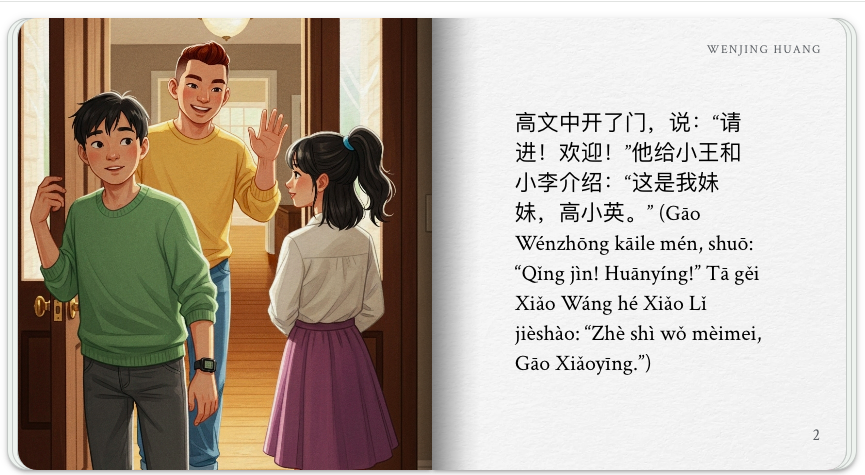
From Prompt to Print: Crafting Personal Illustrated Storybooks with Gemini Storybook
By Wenjing Huang, Chinese Teacher, George School

DOI: https://www.doi.org/10.69732/CEPA3379
Introduction
Gemini Storybook is a new feature in Google Gemini as of August 2025. It generates a personalized 10-page storybook in under a minute with customizable artwork, audio, and text in 45+ languages. You can also upload images, request specific illustration styles, and print coloring books. Gemini will generate a story and illustrations inspired by the prompts used or by images that were uploaded.
| Name of the tool | Gemini Storybook |
| URL | https://gemini.google.com/ |
| Primary purpose of the tool | A platform to create personal illustrated storybooks in the Gemini app using text prompts, photos, and PDFs. |
| Cost | Free if you use your personal account for Gemini.
Google Workspace for Education accounts, which often use .edu email addresses, may have limitations on the Gemini Storybook feature. Depending on the account type and administrator settings, storybook creation may be restricted or unavailable. |
| Ease of use | Simple and easy to use by writing a prompt and optionally adding your own files for Gemini to use. |
Overview
1. Accessing the Storybook Feature in Gemini
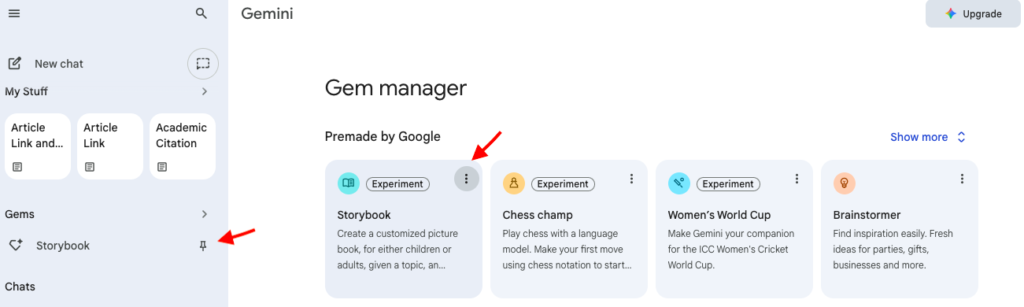
To access the Storybook feature in Gemini:
- Open the Gemini app or go to http://gemini.google.com.
- Tap the Menu (three lines) on the left.
- Click the “Gems” section.
- Select Storybook.
For quick access, you can pin it by clicking the three dots on the right side of the Storybook entry. This will make the pinned storybook accessible under your Gems on the left sidebar every time you log in to Gemini.
2. Making and Revising a Storybook
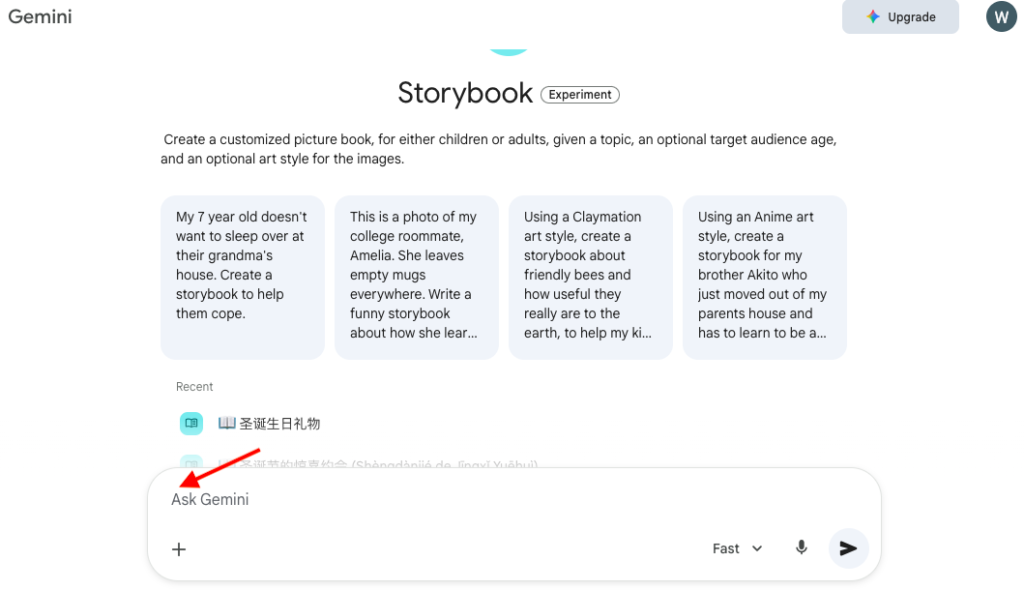
Start a chat with Gemini to describe the storybook you want to create using prompts such as: “Create a storybook about ….by using… (list vocabulary, sentence structures, etc., here).” You can also describe what kinds of pictures you would like in the book by prompting it with “The illustrations should be … style.” Some examples of illustration styles are: cartoon, realistic, sketch, abstract, line drawing, claymation, vintage, etc.
You can also add more details, such as: “Use the uploaded files, photos, or drawings as inspiration for the story and art.”
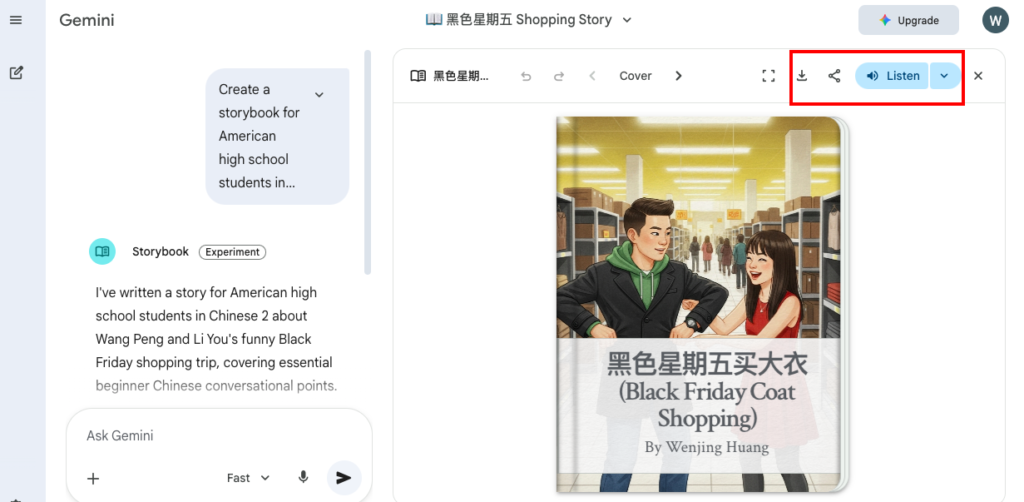
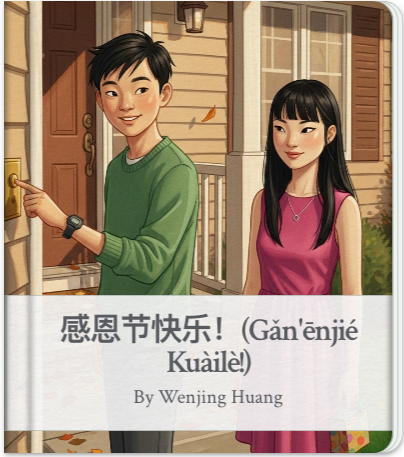
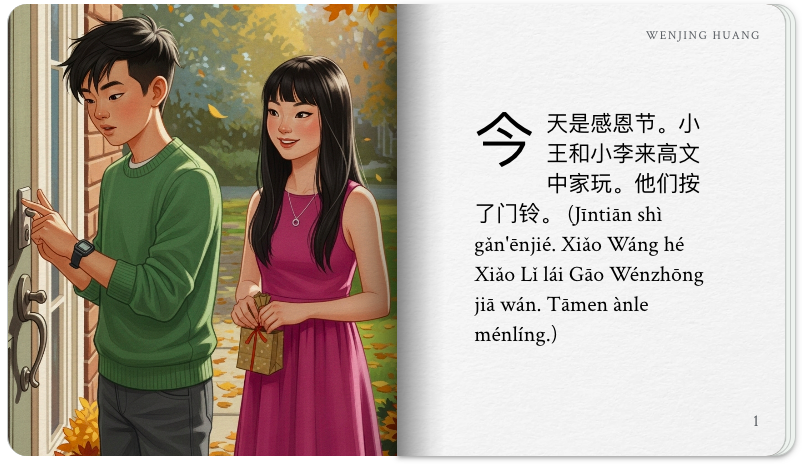
When the storybook is generated, it will be 10 pages, including a cover page that shows the author’s name and subsequent pages that display the author’s name in the top right corner as well as page numbers in the bottom right (see examples in Pictures 4-6). Although you cannot edit the text directly on the page, you can continue to ask Gemini to refine and regenerate the content to meet your needs. Just continue the conversation with prompts like: “Now change the illustration style to…” or “Revise the content… .” Gemini will then create a new version of the storybook based on your feedback.
3. Sharing and Accessing a Storybook
Each storybook created can be downloaded as a PDF and shared via a public link (if you are signed in to your personal account). Currently, workspace and student accounts cannot share storybooks.
You can also print your storybook directly from your web browser or listen to it via narration. For a more professional finish, you may check if your school or local library offers specialized book-making machines that can transform your digital book file into a physical book with a durable cover and binding. Regarding accessibility, Storybook is available to all Gemini users over the age of 18.
Practical Uses for the Language Classroom
1. Ideas for Storybook Prompts
A simple text prompt can focus on specifying proficiency levels or story themes. For example, create a French storybook in a cafe for ACTFL novice high French learners, featuring two main characters and focusing on food and drinks.
You can type the prompt in English, in your preferred target language, or in mixed languages (e.g., both L1 and L2). However, Gemini’s performance is generally strongest in English due to its massive English training data. Additionally, you can request your story text with translations in order to generate dual-language books.
For prompts related to uploading images or files, here are some ideas:
- Screenshot a sentence builder (a structured framework, often a table or grid, that provides learners with vocabulary or grammatical chunks, such as subjects, verbs, objects, and time adverbs, to combine and create many different grammatically correct sentences), upload this image and use a prompt: “Create a storybook using as many phrases as possible from the attached image.”
- Screenshot a complete text, upload this image and use a prompt: “Create a storybook using all the text in the attached image.”
- Upload an image of a character or objective (hand-drawn or AI-generated) that was already in your photo library and use a prompt: “Include this character as the main hero in the storybook.”
- Upload files and use a prompt: “Create a storybook for …grade students about … content using the information in the attached documents. The main characters are… The end of the story is … Make the illustration style…”
- Upload pictures you took and use a prompt: “Use these attached photos as inspiration to create a storybook about… Make the entire storybook in a coloring book style so that it can be printed.”
Below is an example of a prompt I typed in both English and the target language, Chinese, for a Thanksgiving story:
Create a storybook for American high school students in Chinese 1 class. They are learning Chinese in their first year. The story content is about 美国感恩节去朋友家做客. 这个故事出现四个人物:男生名字小王和高文中。女生名字是高小英和小李,是两个朋友小王和小李一起去看一对姐弟高小英和高文中,故事内容主要说说这两个朋友在朋友家喝茶聊天看电视的趣事。请使用以下词汇在这个故事里:请进,介绍,高兴,家,漂亮,坐,杯,瓶,咖啡,可乐,茶,看电视,看电影,聊天,玩,学校图书馆,工作,回家,一起,才,对不起。请给这个故事写一个有趣的结尾。这个故事的中文语言水平适合美国ACTFL规定的初级水平,就是中国小学1年级学生的中文水平。
(English translation: Create a storybook for American high school students in Chinese 1 class. They are learning Chinese in their first year. The story is about visiting a friend’s home for Thanksgiving in the United States. The story features four characters: two boys named Xiao Wang and Gao Wenzhong, and two girls named Gao Xiaoying and Xiao Li. Xiao Wang and Xiao Li, who are friends, are going to visit the Gao siblings: older sister Gao Xiaoying and younger brother Gao Wenzhong. The story focuses on the friends’ visit, describing the enjoyable things they do together at the house, like drinking tea, chatting, and watching TV. Please use the following vocabulary in the story: please come in, introduce, happy, home, beautiful, sit, cup, bottle, coffee, cola, tea, watch TV, watch a movie, chat, play, school library, work, go home, together, only, sorry. Please write an interesting ending for this story. The Chinese language level of this story is suitable for the beginner level according to the ACTFL standards, which is equivalent to the Chinese native language level of a first-grade elementary school student in China.)
One thing to note is that for some languages like Chinese, which have both a pronunciation (Pinyin) and a writing system (Chinese characters), Gemini Storybook might be able to generate story texts in both systems in a lower-level storybook if the proficiency level is explicitly specified in the prompt, even if the prompt does not originally request dual-system generation.
Overall, my experience with the generated texts has been positive. The content aligns well with the proficiency levels specified in my prompts. While some unfamiliar vocabulary is inevitable, the volume remains manageable for students. Furthermore, the narrative logic is consistently sound. For example, in a story about a birthday party featuring 4 characters, the relationships (such as two friends and two siblings, one of whom is celebrating a birthday) established on the first page are maintained accurately throughout the entire 10-page story.
The visual quality of culturally themed storybooks can vary. Gemini Storybook tends to present well-known cultural images accurately, but less common culture items may be missing or inaccurate. In some cases, the text correctly describes a list of cultural items, but the image only shows one famous example. Because of this, it is necessary for teachers to be prepared to elaborate on these images or discuss any discrepancies with students.
2. Ideas for Using Generated Storybooks
Listening: Play the storybook narration directly from Gemini to your students, pairing the audio with traditional listening tasks such as scrambled story sequencing, cloze (fill-in-the-blank) exercises, or audio-to-action drawing.
Alternatively, if you want to integrate the storybook into a digital assessment, you can create a standalone video file: Download the story pictures and upload them to Google Vids, an AI-powered video creation and editing tool. Have students record their voiceovers for each page, then export the narrated project as an MP4 file (or upload it to YouTube). This video can be easily embedded into a Google Form for comprehension checks or reflections. While this workflow highlights Google tools, you can achieve the same results using any preferred video creation or voiceover software paired with your choice of digital assessment platform.
Reading: Use AI tools to generate self-graded quizzes (based on the storybook content) in Google Forms or Formative. Have students create five reading comprehension questions (and an answer key) based on their storybook to give to peers to test their comprehension. In addition, for dual-language books, have students compare two versions and identify any differences.
Speaking: Import the downloaded story PDF file into Book Creator and students record their own voiceovers to improve their pronunciation and fluency. This can be a single narrator or assigning different students to record for specific characters, focusing on emotional expression and intonation rather than just reading. In addition, have students record a reflective preface or an “Author’s Note” at the beginning of the book in the target language or challenge them to add a final blank page to the book to extend beyond the AI-generated text.
Writing: Use the story images to motivate students to create their own story, supported with sentence builders or example structures. Challenge students to write Page 0 or Page 11 while maintaining the established character traits and writing style. For classes with college students or 12th graders over the age of 18, have them use Gemini to generate stories themselves on similar topics, share their classmates’ stories, and then have a discussion about which ones are best, or vote on that.
Conclusion
When creating storybooks for language learners, educators normally face challenges such as lacking relevant existing teaching resources, managing linguistic complexity (vocabulary, grammar) and proficiency levels, balancing between texts and images, and engaging diverse learners. Gemini Storybook is an innovative tool designed to address many of these issues, but like any technology, it has limitations. Therefore, the following chart provides an overview of its strengths and weaknesses based on my experience and for your reference.
| Strengths | Weaknesses |
| Creates a 10-page illustrated story with real-aloud narration in seconds from a text prompt or uploaded images. | There can be inconsistencies in the generated images. For example, the same characters in the story might look different between pages, or the images may not align with the text. Strange images can also sometimes appear (such as a character with 3 hands). |
| You can specify themes, art styles, target audience age, language level, text format, etc. | The tool is sometimes unable to generate one or more images in one storybook. |
| Can be used to teach and create tailored learning materials with questions. | Without specific prompts or missing details, sometimes the tool can produce predictable narratives, or incorrect assumptions about characters or story setting. |
| Available for free on the Gemini app and web interface. It supports many languages. | The tool may generate biases based on its training model, so manual review is required to ensure appropriateness. |
References
Zaineb, A. (2025, September 15). AI Story Generator Explained: Gemini Storybook for L&D. Commlabindia.com.CommLab India. https://www.commlabindia.com/blog/ai-story-generator-gemini-storybook
Google. (n.d.) Gemini Storybook — for the stories only you could imagine.https://gemini.google/overview/storybook/