
Brisk Teaching: An AI Tool Worth a Serious Look
By Gisele El Khoury, St. Lawrence University

DOI: https://www.doi.org/10.69732/EHBU6644
Introduction
Teachers often feel they must spend countless hours providing individualized, timely feedback, creating lesson plans, building quizzes, and differentiating materials for diverse learners, a workload that frequently leads to burnout. Many AI tools on the market today only add to that burden by forcing us to switch between a variety of different tools. Brisk Teaching takes a different approach. Unlike your average AI tool that forces you to switch from tool to tool in order to provide feedback to a student, Brisk Teaching works directly within the tools that you are already using as a teacher. With Brisk Teaching’s free Google Chrome extension, educators can use its tools within Google Docs, Google Spreadsheets, PDF files, Google Slides presentations, YouTube videos, web articles, and many other tools they already use in their daily work. Using Brisk Teaching, educators can generate feedback on student writing, develop assessments from YouTube videos, design lesson plans, differentiate documents (adjust reading levels), build presentations, and generate many additional supports or resources, all of which can be accomplished from one Google Chrome extension panel without leaving the educator’s workflow.
In this review, I will share two of the most powerful features of Brisk Teaching to help you assess your students’ work and improve their engagement with learning. One feature is Brisk’s ability to provide feedback on student writing, while the second is its ability to create comprehension questions based on a YouTube video.
What Is Brisk?
Brisk is a Chrome (and Edge) browser extension that overlays directly onto the tools educators already use, such as Google Docs, Google Slides, PDFs, YouTube videos, web articles, Blackboard, Canvas, ClassLink, Schoolog, and more, without requiring any copying, pasting, or tab-switching. Once installed, you will find a small ‘B’ icon in the lower-right corner of Chrome or Edge that you can click to open an additional overlay for all your other online tools. Educators can install Brisk at no cost and access more than 20 AI-powered tools, including but not limited to comment generation, online quiz generation, reading level adjustment, presentation creation, lesson plan generation, and a tool for detecting AI-generated content (BriskTeaching, 2025). Educators and administrators can also purchase a premium Brisk plan that includes additional tools. However, the free version is extremely useful and would provide any teacher with sufficient resources to get started quickly.
Brisk Tool Overview
| Name of the Tool | Brisk Teaching |
| URL | briskteaching.com |
| Primary Purpose | AI-powered feedback, lesson creation, and instructional support for educators, embedded directly inside Google Docs, Slides, PDFs, YouTube, and other tools teachers already use. |
| Cost (as of March 2026) | Free Forever Plan: 20+ AI tools at no cost; includes a 14-day trial of the full premium experience upon sign-up.
Educator Pro: $99.99/year for individual teachers; unlocks additional feedback styles, faster AI engine, and AI writing detection. Schools & Districts: Custom pricing based on enrollment and number of accounts; includes standards alignment, admin dashboard, professional development, and student-facing tools. |
| Ease of Use | Highly intuitive; installs in under a minute from the Chrome Web Store. A small ‘B’ icon appears in the browser corner and overlays directly onto open documents, no tab-switching, copying, or pasting required. |
Pricing and Plans
Brisk offers three plans, giving educators choices so they can find one that fits their needs and supports them at their institution.
The free plan, which is referred to by Brisk as the “free forever” plan, allows classroom teachers to access more than 20 essential AI tools developed by Brisk, including tools for creating quizzes, planning lessons, making lessons easier for students, and generating feedback on student work through Google Docs, articles, slides, and videos. When teachers sign up for an account, they are automatically given 14 days to use the full suite of premium products for free, after which they will have access only to the free products.
If teachers want additional features available through the Premium plan, they may purchase an annual subscription for $99.99. This individual plan includes a faster, more robust AI engine that provides teachers with easier, higher-quality feedback than they would receive on the free plan. It also provides teachers with the opportunity to create additional types of feedback for their students and additional tools to help teachers check their students’ work for signs of AI. The teacher will benefit from using tools to create instructional materials and from tools that reduce their time spent creating lessons or providing feedback to students.
The Schools and Districts plan from Brisk provides the complete package, which is the highest level of functionality available from Brisk. Schools benefit from access to sophisticated tools and resources to improve teaching, along with ongoing training opportunities, tech support, and guidance on how best to use them. Pricing is customized based on the number of enrolled students or licenses needed and is extremely flexible to fit the institution’s needs. This level also offers everything from the Premium plan, including full alignment with local academic standards, an administrator portal/dashboard, district-level insights, customized data privacy agreements, and software to access these tools for students (e.g., Brisk Boost for Chrome). Schools and districts interested in this plan can schedule a demo and receive a customized price quote via Brisk’s website.
Personalized Written Feedback on Student Compositions
One of Brisk’s most beneficial features is its ability to provide direct feedback on student submissions in a Google Doc. When you activate Brisk, a pop-up will appear, with several options:
- Creating assessments from content (videos or texts)
- Generating lesson plans
- Building presentations
- Producing differentiated reading materials
- Inspecting student writing
- Providing targeted feedbacks
- Adjusting content difficulty level.
While all these options are very helpful, this review may help you understand how the Give Feedback feature significantly reduces the time to complete grading.
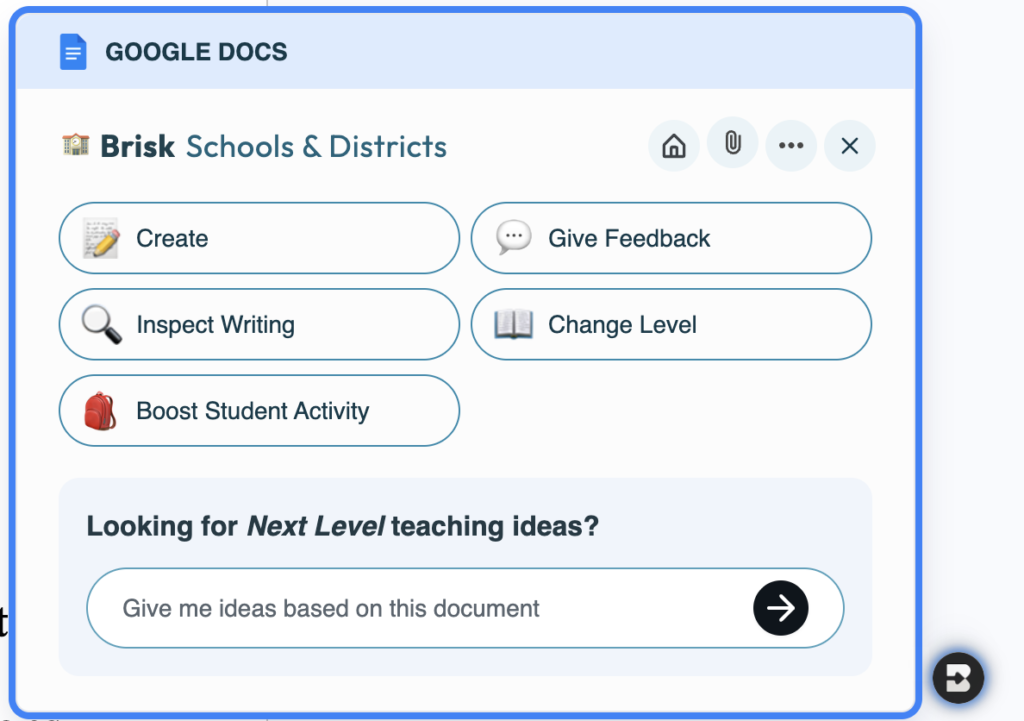
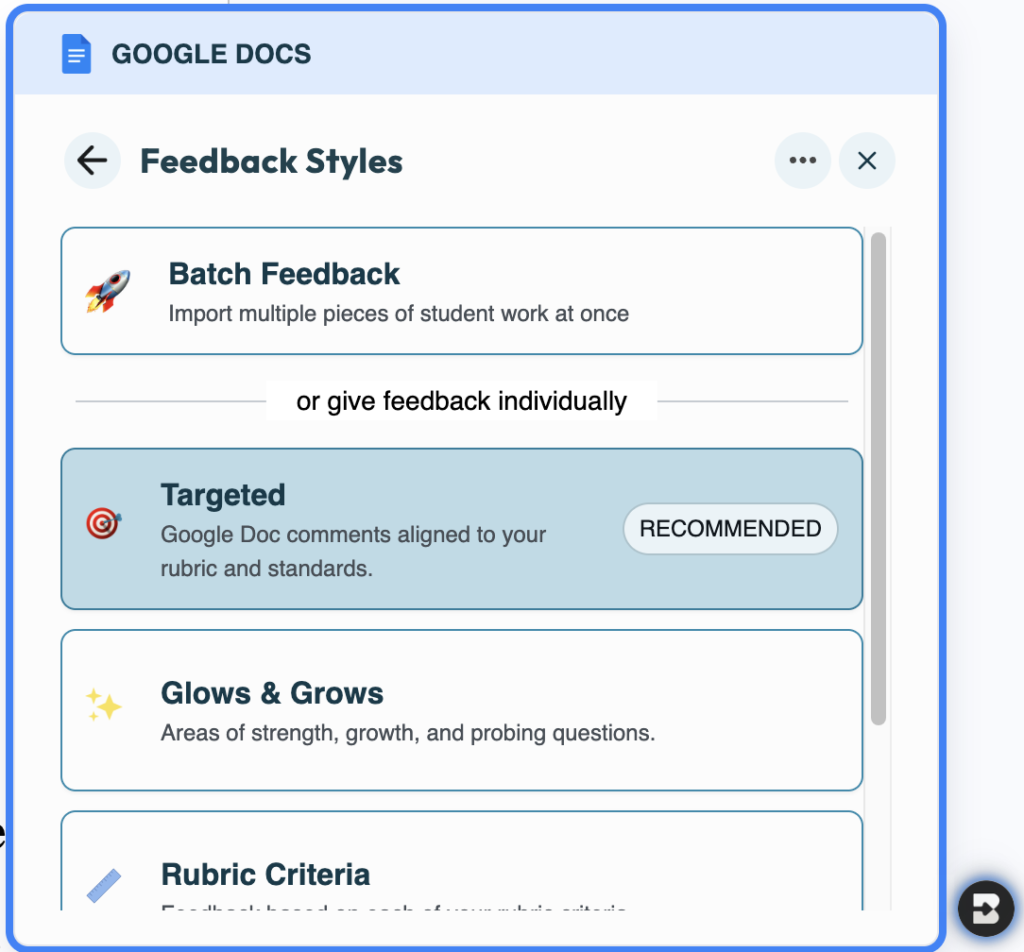
After you select “Give Feedback,” you can choose from options like:
- Batched Feedback (premium) lets you grade an entire class of assignments at once. Instead of opening each student’s document one by one, you can import all submissions directly from Google Classroom or a Google Drive folder, apply your preferred feedback style, review all of Brisk’s suggested comments in one place, and post them to every student’s document with a single click.
- Targeted Feedback (premium) is when the AI creates comments in the document margins related to specific sentences or paragraphs.
- Glows & Grows provides a balanced overview of strengths (Glows), areas for improvement (Grows), and “Wonderings” associated with the assignment, encouraging deeper student thinking.
- Rubric Criteria allows the AI’s feedback to be linked to a specific set of criteria you have uploaded or created in the system and used in providing the feedback.
- Next Steps allows students to have an organized list of specific items they need to revise for their next draft.
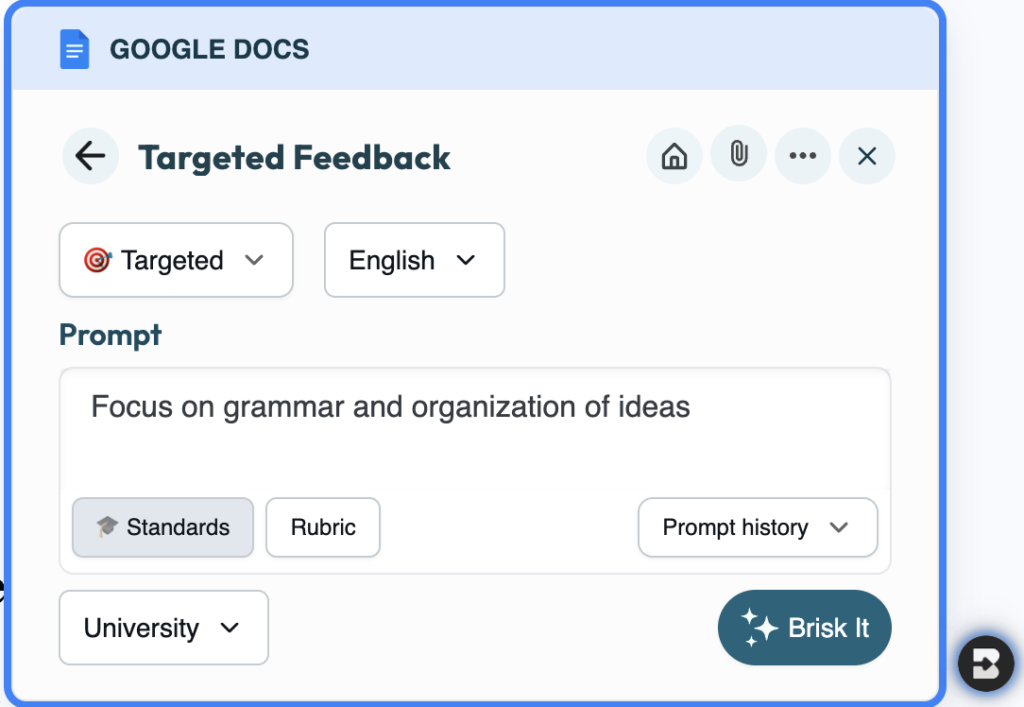
For this demonstration, I will choose “Targeted Feedback.” Once you click it, you will then be taken to a new window that offers a surprising amount of customization for such a compact tool. In this view, you have the option to:
- Specify a Focus: Use the Prompt box to give Brisk a specific goal, such as “Focus on grammar and organization of ideas.”
- Specify Your Language and Level of Understanding: To switch languages for the generated feedback (over 50 languages are supported for this, while the general content creation tools reference more than 30 languages), just use the drop-down menu to choose your language. For the level of student you are providing feedback to (K-12 or Post Secondary), you can use the drop-down menu to select the level of understanding. If your learners are lower level, you may want to experiment with choosing K-12 and see if this helps the tool to keep the language level approachable for these students.
- Align with State Standards & Create Your Own Rubrics: Click the Standards button to bring in specific criteria or standards in national/state or rubric-based grading formats.
- Review Prompt History: If you have a specific way that a previous class used a particular phrasing for encouragement, you can easily find it in the Prompt history drop-down menu.
When you hit the blue “Brisk It” button, all the fun starts to happen. Brisk instantly starts populating your student’s Google Doc with draft comments in the margin. These comments remain invisible to the student until you personally review them and click “Comment” to share, keeping you fully in control of what gets posted.
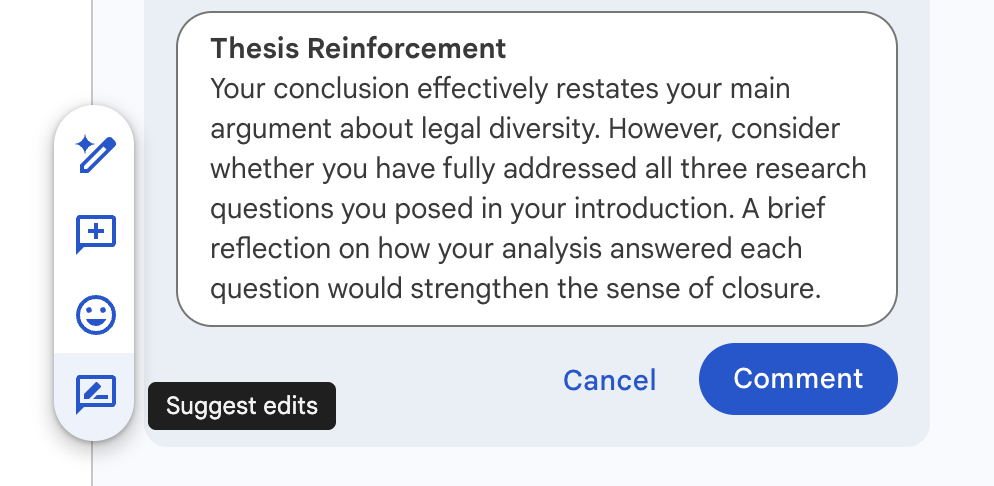
Overall, these features make the feedback process much more efficient without taking away the teacher’s role in adjusting and approving feedback.
Generating Comprehension Questions from YouTube Videos
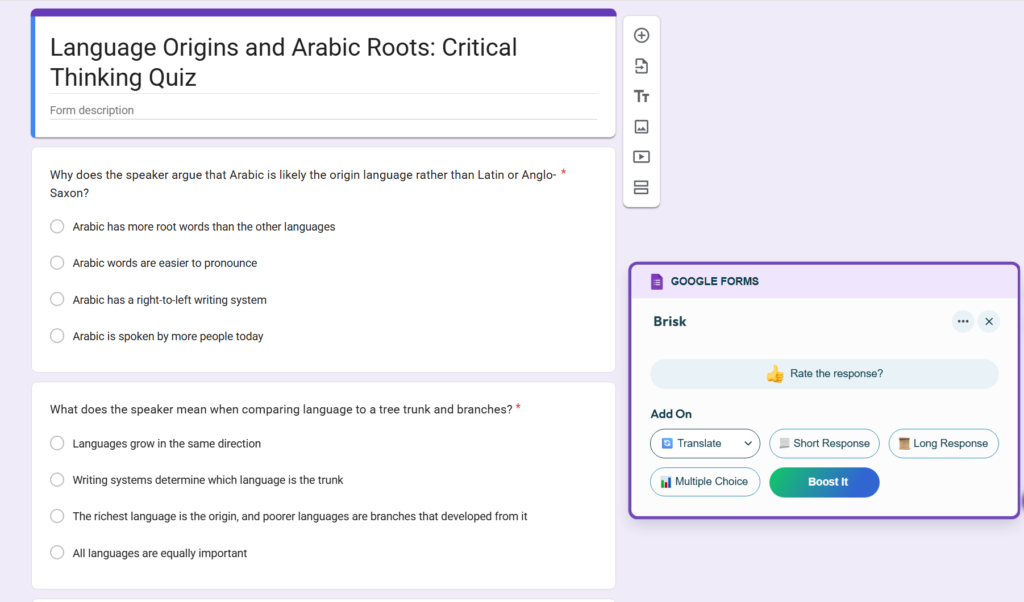
Brisk also includes the ability to generate comprehension questions (quizzes) from a YouTube video. For teachers who often assign video-based material, this helps students move from passive viewers to active learners and enables teachers to assess their understanding using Brisk. Creating a quiz from a YouTube video is very easy: When viewing any YouTube video with a transcript, just click the Brisk “B” icon, select Create, then Quiz.
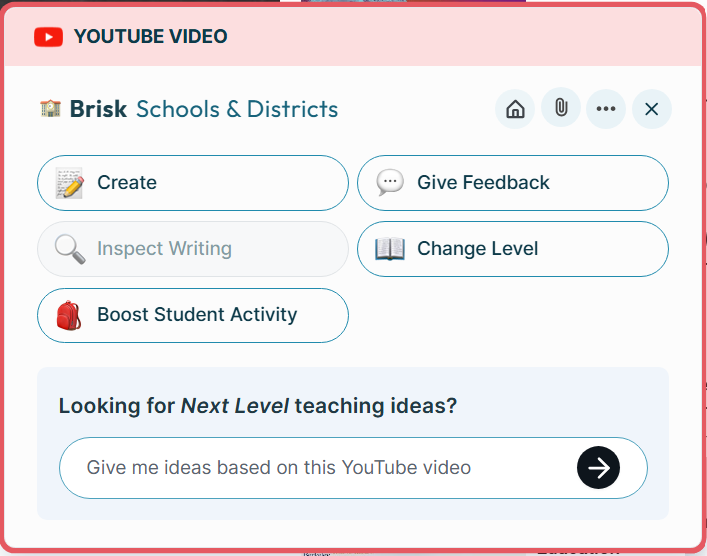
Brisk reads through the video transcript and prompts you to customize the quiz right away. You have the ability to adjust the following options for your quiz: grade level, number of questions, language of the questions, and question type (multiple choice, short response, or both). You also have the option for Brisk to output the quiz as a Google Doc or Google Form, including an embedded answer key for use with Google Forms’ auto-grading feature (Ditch That Textbook, 2025).
Language teachers can easily and quickly create assignments using YouTube videos in the target language, then generate comprehension questions for students based on the video content using Brisk. Teachers have complete control over the questions and can review each one before sharing it with the students. If they feel the question does not accurately reflect the content, they can edit or remove the question within the same Google Form used to create it, as well as add more questions or change the language of particular questions if desired.
One thing to keep in mind when using Brisk to generate questions is that the video must have a transcript or closed captioning for Brisk to work. Auto-generated captions from most YouTube videos will work well; however, videos without spoken language or without transcripts will not work well with Brisk. Additionally, this feature is available free of charge to all educators, regardless of subscription status (Brisk Teaching, 2025). If a video doesn’t have a transcript, teachers can use a tool like TurboScribe to create one that could be used within Brisk.
Strengths and Limitations
Brisk Teaching has many advantages; however, its greatest asset is that many of its features are free for teachers. As a result, cost is not a barrier to the use of Brisk Teaching (Matika et al., 2025). The system works seamlessly by using tools most teachers already utilize in their classrooms (e.g., Google Docs, Google Slides, YouTube, and PDFs), so there’s no need to switch between platforms or learn a completely new interface. With its ability to provide feedback in 50+ languages, Brisk Teaching will be especially useful for teachers in diverse, multilingual classrooms. In addition, teachers can select a variety of different feedback options for their students, such as Glows and Grows, Rubric Criteria, Next Steps, and Targeted Feedback (note that not all of these are available in the free version). Therefore, teachers have extensive versatility in how they communicate with their students. A Brisk premium account includes batch feedback, allowing an entire class’s worth of work to be evaluated in one sitting. In addition to feedback, Brisk offers more than 20 AI-based tools in the free version and more than 30 in the premium plan, including lesson planning, quizzing, presentations, etc. Also, Brisk has achieved a 93% or higher rating with Common Sense for privacy (the highest rating of all AI products in this category) and takes only minutes to install.
Brisk’s limitations must also be considered. The only browsers supporting Brisk are Edge and Chrome (there are no mobile versions available), which could be an issue for schools where many teachers/students primarily use phones and tablets, though tablets can use the web interface. Some educators have shared that, when using AI-generated prompts, they were limited in the types of feedback they could provide compared to other applications that offer more opportunities for creative prompt construction. The use of too many AI-generated responses can also devalue the uniqueness of feedback provided directly by the teacher to a student (Henderson et al., 2025). Finally, if campuses have a very restrictive Firewall, teachers may need to contact the school’s Information Technology Department to enable access to the service before it can be used in the classroom.
Conclusion
Brisk Teaching is a positive step forward in using artificial intelligence to support teachers, while keeping the human element essential to good teaching intact. Brisk has positioned itself as a very accessible and useful AI tool today by being built directly into the tools many teachers already use, offering feedback capabilities in multiple languages, and offering a robust free tier. Although some of the more advanced features require a school or district subscription, the core offering is powerful enough to save teachers enormous time and increase their efficiency in delivering consistent, personalized feedback to students during their teaching practice. If you’re a classroom teacher looking to improve your grading process, or if you’re a school administrator looking for scalable AI solutions, Brisk Teaching is worth serious consideration.
References
AVID Open Access. (2025, March 14). Brisk Teaching: An AI teaching assistant and writing feedback tool. AVID Open Access. Retrieved from https://avidopenaccess.org/resource/brisk-teaching-an-ai-teaching-assistant-and-writing-feedback-tool/
Brisk Teaching. (2025, June). Brisk Teaching official findings report. ISTE Seal. Retrieved from https://cms-live-media.iste.org/iste-seal/reports/Brisk-Teaching-Official-Findings-Report-June-2025.pdf
Brisk Teaching (2026). Pricing Plans. https://www.briskteaching.com/plans
Brisk Teaching. (2026, January 9). Brisk Teaching and YouTube: AI tools revolutionizing your classroom. Brisk Teaching Blog. Retrieved from https://www.briskteaching.com/post/brisk-teaching-and-youtube-ai-tools-revolutionizing-your-classroom
Ditch That Textbook. (2025, September 19). Create lesson plans, quizzes, and presentations in seconds with this must-have Google Chrome extension. Retrieved from https://ditchthattextbook.com/brisk/
Henderson, M., Bearman, M., Chung, J., Fawns, T., Buckingham Shum, S., Matthews, K. E., & de Mello Heredia, J. (2025). Comparing Generative AI and teacher feedback: student perceptions of usefulness and trustworthiness. Assessment & Evaluation in Higher Education, 1–16. https://doi.org/10.1080/02602938.2025.2502582
Lunden, I. (2025, March 26). AI’s coming to the classroom: Brisk raises $15M after a quick start in school. TechCrunch. Retrieved from https://techcrunch.com/2025/03/26/ais-coming-to-the-classroom-brisk-raises-15m-after-a-quick-start-in-school/
Matika, D., Gregurec, I., & Oreški, D. (2025). The use of the Gen AI tool Brisk Teaching in the educational process and its impact on student motivation. Conference paper, Zagreb School of Economics and Management. Retrieved from https://www.researchgate.net/publication/393987074
AI Disclosure: Grammar and sentence structure were reviewed using Grammarly. All pedagogical applications and personal anecdotes are the original work of the author.